Control your home,room by room.
SmartPanel turns any touchscreen into a dedicated wall-mounted control center for the room it's in — lights, climate, shading, media, sensors, and security, all on one screen. No cloud. No subscription. Just your home, under your control.
See every screen, as it really looks
Every part of your home gets its own dedicated screen — designed for touch, built for the wall, and always showing exactly what you need.
Home Dashboard
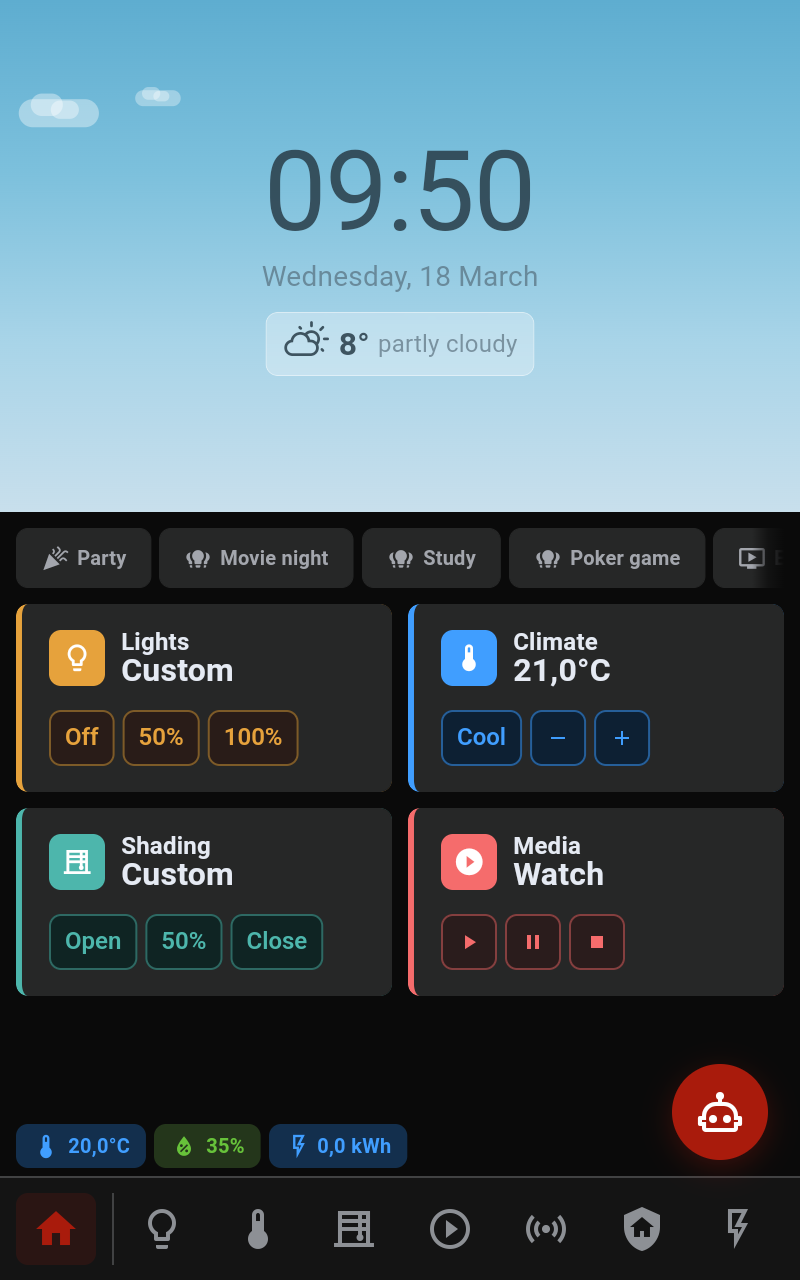
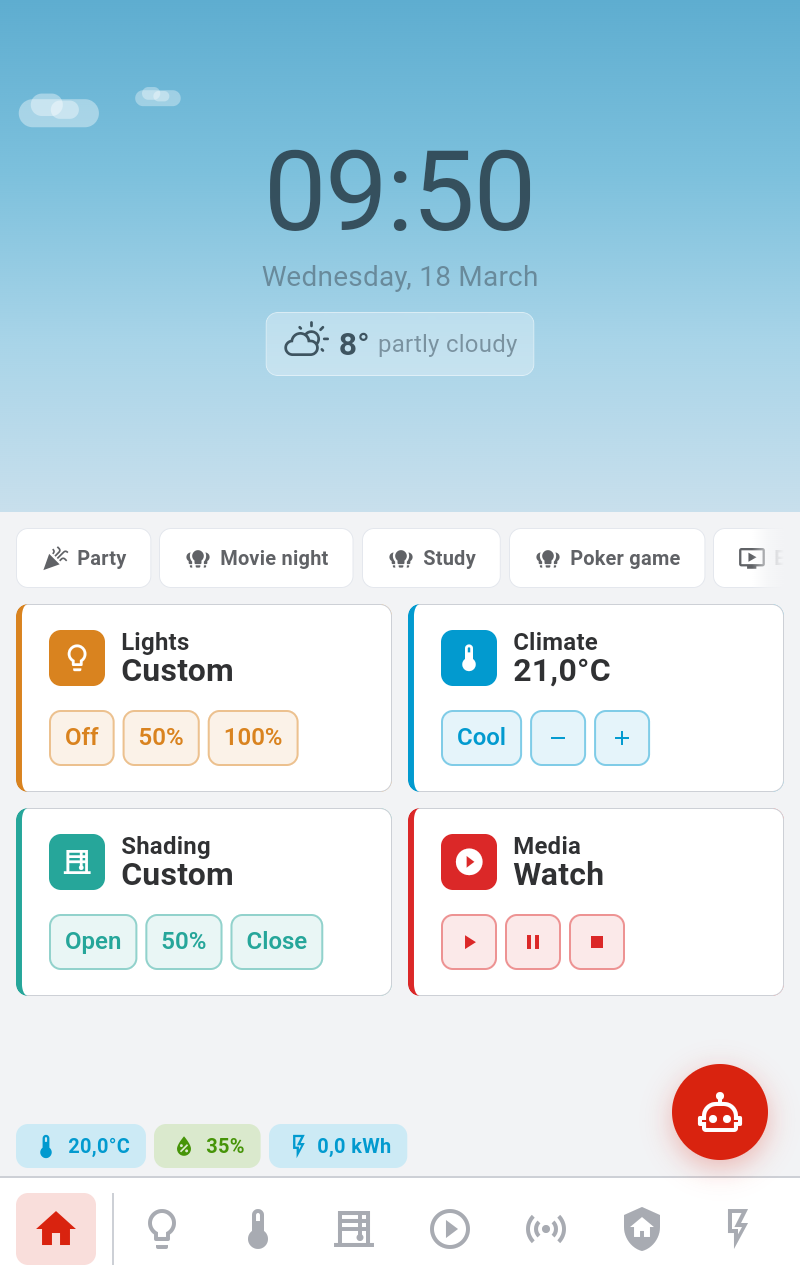
DefaultYour starting point — a live snapshot of the room your panel lives in. See the weather, check your sensors, and jump into any domain with a single tap.
Current conditions, animated sky, and outdoor temperature are always visible at the top of the screen. The display updates automatically from your configured weather provider, so you know what’s happening outside before you open the door.
Indoor temperature, humidity, and energy usage are displayed in a persistent strip right below the weather. These values come from the sensors assigned to the room, giving you a quick health check of your space at any time.
Lights, climate, shading, and security each get their own tile showing the current state. Tap any tile to make a quick adjustment, or tap through to open the full domain screen for more detailed control.
The interface switches between light and dark themes automatically based on the time of day. You can also set it manually if you prefer a specific look — great for hallways or bedrooms where you want a dimmer display at night.
Room Mode
Every panel knows
its room.
Each panel is tied to a specific room. When you walk up to it, you see only what belongs to that space — the lights, thermostat, blinds, and sensors that are actually there. No scrolling through a list of every device in the house.
Your home is organized into Spaces (rooms and zones), and every device is assigned a Role that describes its purpose. Your ceiling light gets the "Main" role; the floor lamp is "Ambient". The panel uses these roles to build the right interface automatically.
Architecture
How It Works
Three apps working together — you configure everything in the Admin App, the Backend keeps it all in sync, and the Display App brings it to life on your wall panel. All connected in real time.
Optimized for Embedded Devices
Everything runs directly on a Raspberry Pi or any embedded Linux board with a touch display. No cloud services, no subscriptions — just your hardware, your network, and your data.
Integrations
Works with
what you already have.
SmartPanel connects to your existing smart home setup out of the box. Start with Home Assistant or Shelly devices, use the Third-Party API for custom setups, or build your own plugin with the open extension system.
Already running Home Assistant? SmartPanel connects directly to your instance and syncs all your devices, entities, and sensor values in real time. No need to reconfigure anything — your existing setup just works. Devices and their states appear on the panel automatically, making it the fastest way to get started.
Full support for the entire Shelly lineup — from Gen1 devices to the latest Plus and Pro series. Two dedicated plugins cover all generations with real-time control, energy monitoring, and automatic local discovery. Everything runs cloud-free over your local network.
Connect any system that can talk HTTP. Push device states into SmartPanel and receive commands back through your own API endpoints — a flexible bridge for custom setups, proprietary hardware, or any integration you want to build yourself.
SmartPanel's backend is built on a modular plugin architecture with a growing list of integrations — including Zigbee2MQTT. Z-Wave and MQTT are on the roadmap, and the Extension SDK lets developers create and share new plugins for any protocol or platform.
AI Assistant
Meet Buddy.
Your panel's brain.
An AI assistant that lives right on your panel. Ask it to dim the lights, check the temperature, or suggest a bedtime routine — by text or voice. Over time, it learns your habits and starts helping before you even ask.
Text & Voice Chat
Ask questions, control devices, or get suggestions in plain language. Type on the screen or speak out loud — Buddy understands both.
Learns Your Habits
Buddy watches how you use your home and notices patterns. It can suggest automations like "dim the lights at 11 PM" or alert you when something looks unusual.
Your Choice of AI
Use Claude, OpenAI, or Ollama as the brain behind Buddy. Or run fully offline with built-in rule-based intelligence — no cloud connection needed.
Tech Stack
Open Source. Built to Last.
Every part of SmartPanel is built with modern, proven open-source tools. Easy to understand, easy to contribute to, and designed to run reliably on small devices.

Display App
Built with Flutter for a fast, 60fps touch interface that runs smoothly on embedded Linux displays.

Admin App
A responsive web app built with Vue, Pinia, and Vite — manage devices, rooms, and layouts from any browser.

Backend
A modular NestJS server with SQLite for config and InfluxDB for time-series data. Fast, lightweight, and plugin-driven.

API
Fully documented REST API with OpenAPI spec, plus real-time WebSocket communication for live updates.
Quick Start
Up and running
in four steps.
SmartPanel runs on a Raspberry Pi or any embedded Linux device. No cloud accounts, no subscriptions — just install, configure, and mount on the wall.
Prepare your device
Flash your Raspberry Pi with our ready-made image, or install the SmartPanel packages on any Linux device with a touch display. The installer handles the rest.
Set up your rooms
Open the Admin App in your browser and define your spaces — living room, bedroom, kitchen. Assign devices to each room and give them roles like Main, Ambient, or Sensor.
Connect your devices
Enable the Home Assistant or Shelly plugin to automatically discover and sync your existing devices. Or use the Third-Party API to connect any custom system.
Mount & enjoy
Assign the display to a room, mount the panel on the wall, and you’re done. The screen shows everything that belongs to that space — always up to date, always in sync.
Why SmartPanel
Built different.
Not another dashboard app. SmartPanel is purpose-built for wall-mounted touch displays — designed to be fast, private, and beautiful out of the box.
Offline-first
Everything runs locally on your network. No cloud accounts, no internet dependency, no data leaving your home. Your smart home stays yours.
Modular by design
Install only what you need. The plugin system lets you add integrations, UI components, and data sources without touching the core.
Made for touch
Every screen is designed for wall-mounted displays you tap from arm’s length. Large targets, clear contrast, and no tiny buttons to fumble with.
Beautiful interface
A clean, modern UI inspired by the best smart home apps. Light and dark themes, smooth animations, and a consistent design language across every screen.
Fast & lightweight
Optimized to run on a Raspberry Pi with limited resources. The Flutter display app delivers 60fps animations, and the backend starts in seconds.
Fully open source
Every line of code is on GitHub. Read it, fork it, contribute to it. No hidden services, no proprietary lock-in — just transparent, community-driven software.
Roadmap
What's coming next.
SmartPanel is actively developed and growing fast. Here's a look at what we're working on and where the project is headed.
Matter support
A Matter plugin is in the works — bringing native support for the new smart home standard. Connect any Matter-compatible device directly, no bridge needed.
Room activity modes
Define modes like Movie Night, Sleep, or Work for each room. One tap switches the lights, climate, shading, and media to match — fully customizable in the Admin App.
Smart automations
Time-based scheduling, occupancy-aware triggers, and seasonal defaults. The panel will adjust your room automatically based on the time of day, who’s home, and the season.
AI Buddy face
Give your AI assistant a visual personality. An animated face on the panel display that reacts to conversations, shows emotions, and makes Buddy feel more alive.
Desktop admin app
A standalone cross-platform desktop app for managing your panels locally — no browser needed, with a native feel on macOS, Windows, and Linux.
Custom hardware
A dedicated wall-mounted display designed from the ground up to run SmartPanel. Open hardware, purpose-built enclosure, ready out of the box.
Ready to build your panel?
Set up your SmartPanel in minutes with our step-by-step guide. Join the growing community of smart home enthusiasts building something better — open, local, and beautiful.